Maintenance manager for working property teams

Run maintenance without chasing every update.

Simeonware gives property managers one place to receive tenant requests, invite vendors, approve bids, track photos and costs, and know the next step on every job.

No credit card requiredTenant, staff, and vendor portals includedCSV import and export ready
Maintenance queue
Today's queueWhat needs attention
New request
12Open
3Needs follow-up
2Scheduled today
Urgent
Water leak under kitchen sinkWillow Creek - Unit 204
Needs vendor
Scheduled
Air conditioner not coolingPark View - Unit 18
Today, 2:00 PM
Review
Replace hallway light fixtureOak Terrace - Common area
Vendor complete
Know the next stepEach request surfaces the manager action to take now
Bid without losing contextInvite vendors, compare replies, and approve from the request
Keep records togetherPhotos, notes, approvals, costs, and closeout stay with the job
Move data by CSVImport and export units, vendors, and tickets for your own systems
The real product

See the maintenance workflow before you start.

These are real Simeonware screens showing tenant intake, manager decisions, vendor coordination, and reporting in the same product.
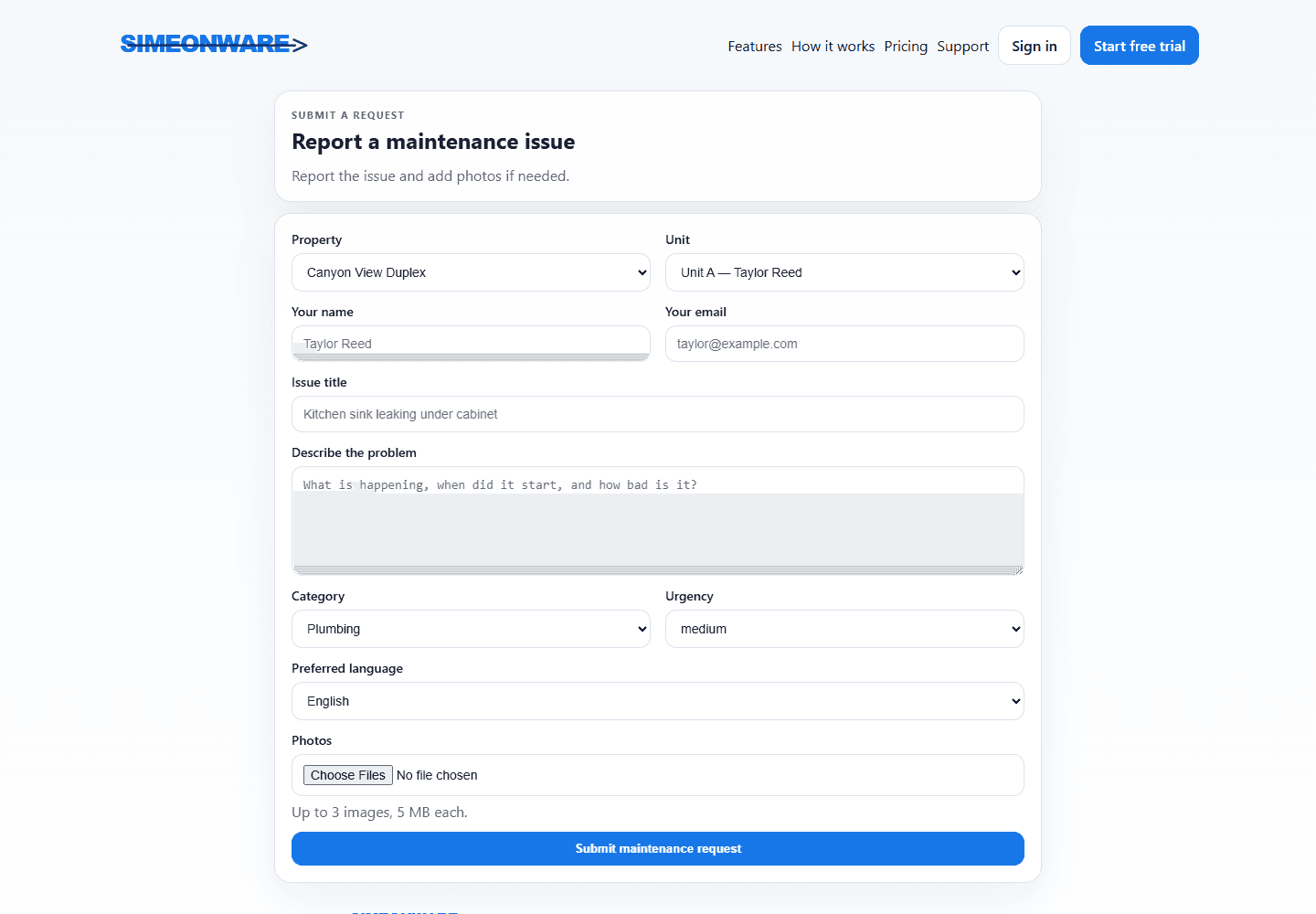
Simeonware tenant maintenance request intake form
Request intakeTenants share the issue, access notes, and photos in one guided form.
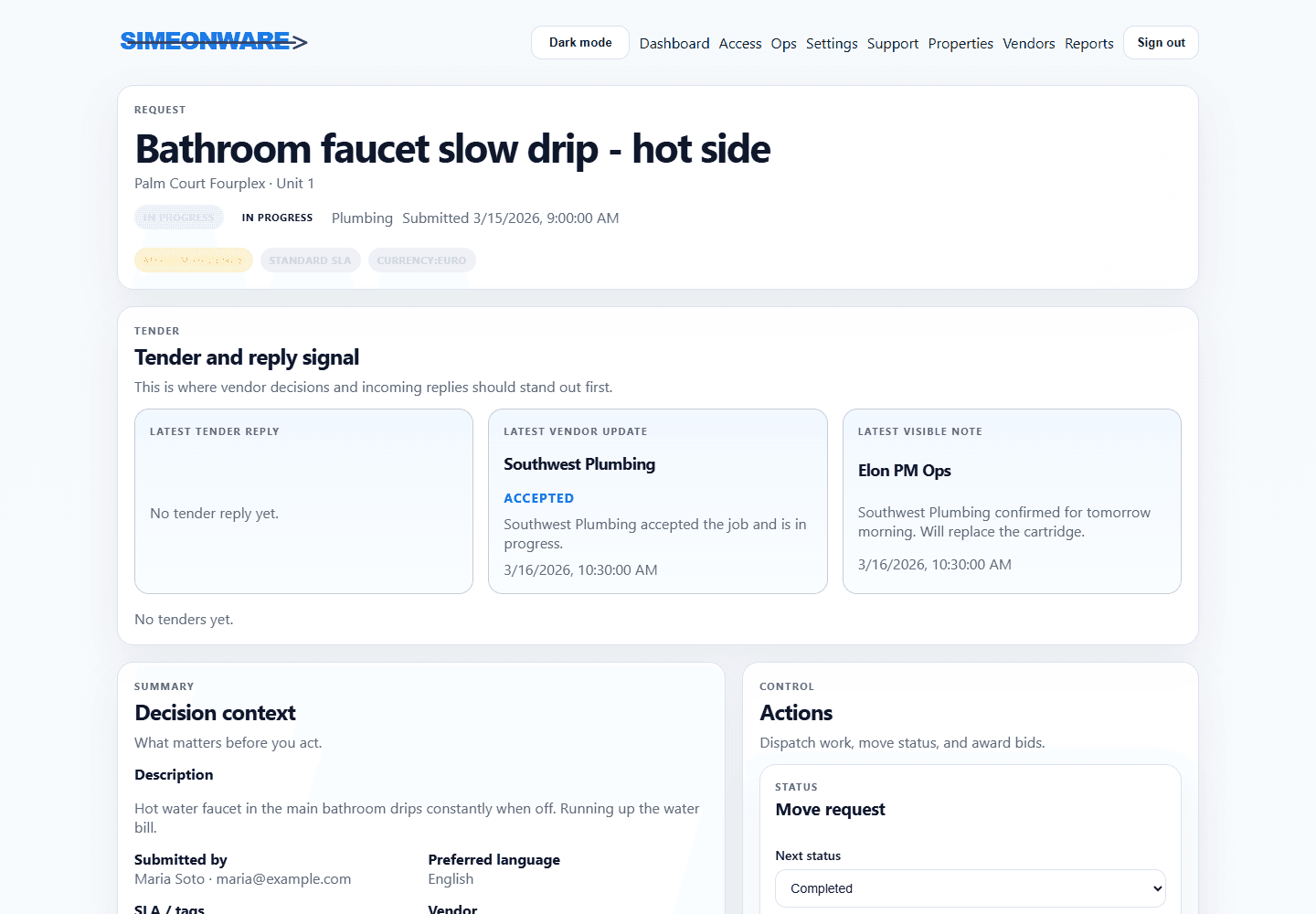
Simeonware request detail showing vendor coordination signals
Vendor coordinationInvite bids, approve the right vendor, and keep scheduling updates tied to the job.
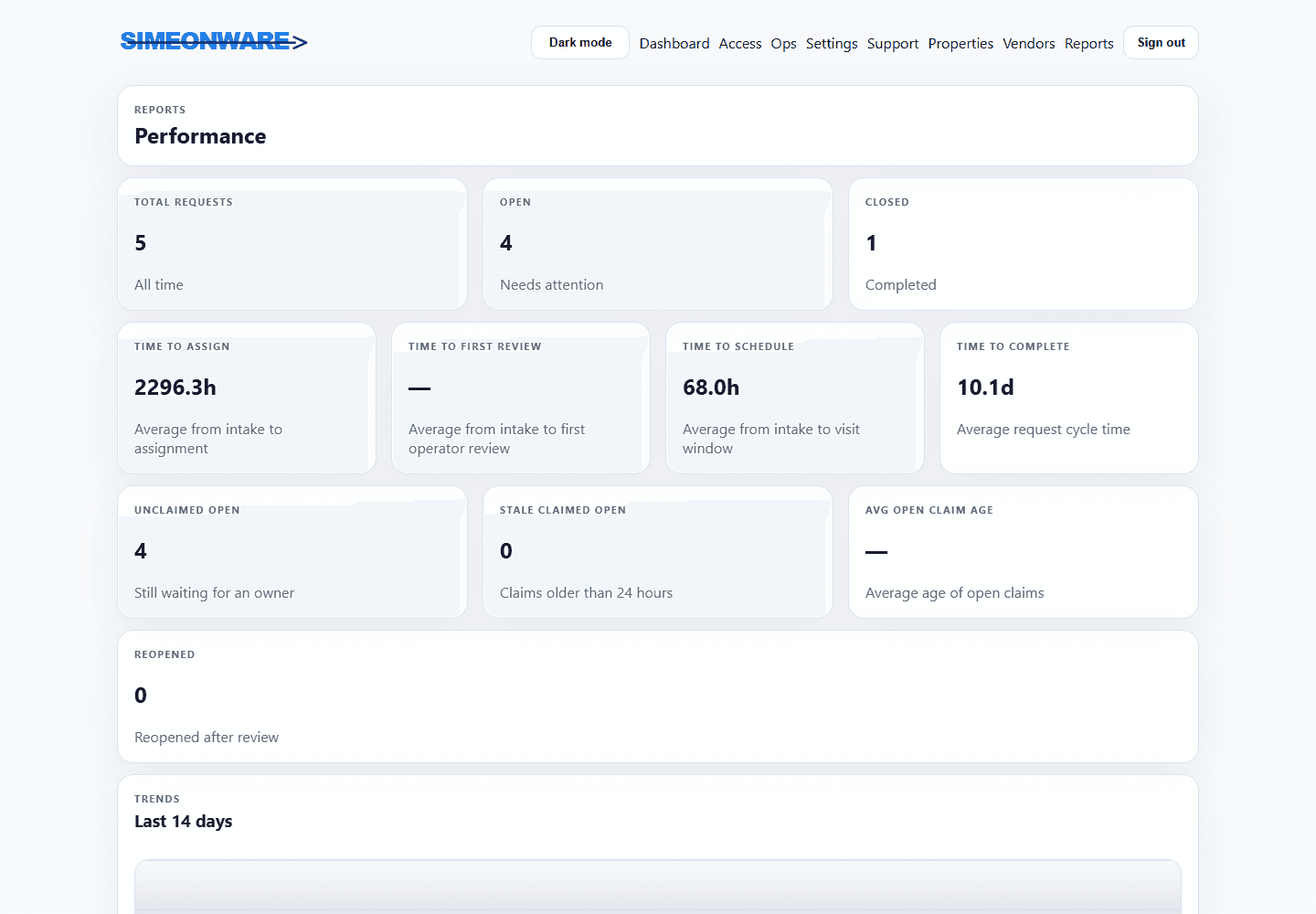
Simeonware property maintenance performance reports
Operational recordsView request details, aging, costs, CSV exports, and closeout activity.
All-in-one maintenance manager

All-in-one maintenance management, not another rent ledger.

Simeonware is built for the maintenance work property managers repeat every day: tenant intake, vendor bids, approvals, photos, billing records, closeout notes, and CSV movement for custom systems.

01

One focused maintenance command center

See urgent, overdue, scheduled, completion-review, and payment-open work from one queue built around maintenance operations.

New requests 5Needs follow-up 3Completion review 2
02

Tenant, vendor, and manager portals

Tenants report issues, vendors respond from their own view, and managers control what each side can see.

03

Vendor bids and approvals

Invite vendors to bid, compare price and availability, approve the right option, and keep the decision with the request.

04

Costs stay connected to the job

Track vendor invoices, approved overages, tenant billbacks, supporting notes, and closeout history beside the work order.

05

Private photo and note trail

Maintenance photos, tenant-visible notes, and manager-only/vendor notes stay attached to the request with role-based access.

06

CSV in and out for custom systems

Upload and download units, vendors, and tickets by CSV so your maintenance data can fit into your own reports, spreadsheets, or custom workflows.

07

Suggested next step on every request

Each ticket shows the recommended next action first so managers know whether to assign, approve, update, bill, or close the work.

08

Automatic vendor follow-up

Send one daily reminder while a vendor action is outstanding, with a portfolio-wide default and an override on each ticket.

09

Inspections and unit turns

Run reusable inspection checklists, document findings with photos, create reports, and move every vacant unit through a consistent turn plan.

10

Maintenance calendar and direct scheduling

Let tenants choose from approved appointment times, keep planned work on one maintenance calendar, and publish confirmed schedules to Outlook.

11

In-house teams and smarter assignment

Route work by skill and capacity, manage common-area jobs, and give maintenance employees their own portal for updates, time, materials, and photos.

12

Multilingual communication

Growth and Pro teams can give managers, tenants, vendors, and staff a translated workspace while every message keeps its original wording.

Payments are intentionally separate from the core maintenance manager. Today, Simeonware tracks approvals, billbacks, vendor payment records, and closeout status; online payment processing is planned as a future add-on.

QuickBooks Online compatible

Approved maintenance costs, ready for your books.

1

Approve

Review vendor invoices, tenant chargebacks, staff labor, and materials beside the work order.

2

Sync

Send approved bills, customer invoices, vendors, and categorized costs to QuickBooks Online without entering them twice.

3

Reconcile

See whether each transaction is ready, synchronized, or needs attention, and refresh payment status from QuickBooks.

Simple pricing

Start free. Choose the capacity that fits.

Every plan includes the complete maintenance workflow. Plans differ by active-unit capacity and multilingual communication.

Starter

$39/month

Includes capacity for 25 active units.

English-only planManager, tenant, vendor, and staff workspaces and notifications remain in English.

Purchase additional unit capacity in one block for $1.50 per slot each month. Adding units within that allowance does not change billing.

  • Complete manager request queue
  • Tenant, maintenance staff, and vendor workflows
  • Billing records and reports
  • Email notifications and history
  • English interface and communication
Start free trial
Most popular

Growth

$99/month

Includes capacity for 75 active units.

14-language communication includedEach user can choose their language. Requests, messages, email, and push notifications are translated.

Purchase additional unit capacity in one block for $1.50 per slot each month. Adding units within that allowance does not change billing.

  • Complete manager request queue
  • Tenant, maintenance staff, and vendor workflows
  • Billing records and reports
  • Email notifications and history
  • Translated workspace and communication
Start free trial

Pro

$249/month

Includes capacity for 250 active units.

14-language communication includedEach user can choose their language. Requests, messages, email, and push notifications are translated.

Purchase additional unit capacity in one block for $1.50 per slot each month. Adding units within that allowance does not change billing.

  • Complete manager request queue
  • Tenant, maintenance staff, and vendor workflows
  • Billing records and reports
  • Email notifications and history
  • Translated workspace and communication
Start free trial

Annual billing includes two months free. Purchase additional capacity in bulk for $1.50 per unit slot each month; the next tier is applied automatically when it becomes less expensive. No capacity payment is charged during the 30-day trial, and checkout shows the exact first bill based on active units. Multilingual communication is included with Growth and Pro.

Subscription

Check your subscription online.

Check or manage your subscription online at simeonware.com in a web browser.

Frequently asked questions

Know what to expect.

Have another question? Contact support.

Do tenants and vendors need paid accounts?

No. Property managers control the account and invite tenants and vendors into the workflows they need.

Do I need a credit card to try Simeonware?

No. You can use the complete product for 30 days before adding a payment method.

What changes between plans?

Active-unit capacity and multilingual communication. Starter is English-only. Growth and Pro include 14-language workspaces, translated requests and messages, and localized notifications. Core maintenance features are included across every plan.

Can I cancel or change plans?

Yes. Plans are available month to month, with an optional annual discount.

A clearer maintenance workflow starts here

Start with the maintenance work that slows your team down.

Start your 30-day free trial and see tenant requests, vendor bids, approvals, photos, costs, CSV exports, and closeout in one workspace.

Start free trial